---
title: How do I edit my property listing information?
description: Change or add to the information you have entered about your property. Set up your horse layover listing which consists of the property information, rental sites for humans and your guest's horses. Change property photos.
---
[Skip to content](https://resources.giddyupgetaway.com/en/how-do-i-edit-my-property-listing-information#main-content)
English
Show submenu for translations
![FAVICON Transparent nail holes.png\]](https://resources.giddyupgetaway.com/hs-fs/hubfs/FAVICON%20Transparent%20nail%20holes.png?height=40&name=FAVICON%20Transparent%20nail%20holes.png)
Open main navigation
Close main navigation
- English
Show submenu for translations
- [Go to homepage](https://giddyupgetaway.com/)
[Go to homepage](https://giddyupgetaway.com/)
Resources & Help Articles
- There are no suggestions because the search field is empty.
1. [Resource Center](https://resources.giddyupgetaway.com/en?hsLang=en)
2. [Hosting Info](https://resources.giddyupgetaway.com/en/hosting-info?hsLang=en)
3. [Create & Edit Your Listing](https://resources.giddyupgetaway.com/en/hosting-info?hsLang=en#create-edit-your-listing)
# How do I edit my property listing information?
## To edit or change photos to your existing property listing follow the steps below:
1. From the website [Homepage](https://giddyupgetaway.com/), click on your profile picture icon in the upper right corner of the page.
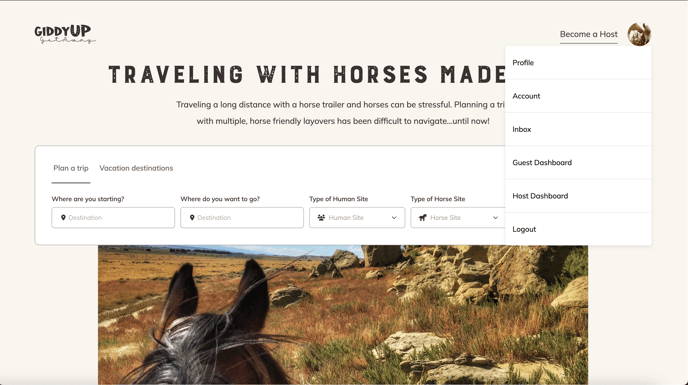
2. Scroll down and click **Host Dashboard**.
3. On the header bar click **Listings**.
4. On the table, scroll down to find the property that you want to edit.
5. On the far right column of the table, under Actions, click the 3 buttons on the far right column of the table.
6. Scroll down to **Edit.**
7. On the navigation table on the left, under Edit Listing, select **Edit Property Info.**
8. All of the information you previously entered will automatically populate.
9. Scroll up or down to find the section you need to edit.
10. To change the main photo, scroll down to the photo section and hover your mouse over the main photo. Click the button that appears, called **Change Photo**.
11. Go into your photos either on your desktop or smart phone and select the replacement photo.
12. Replace the four other photos by scrolling to find the photo you want to replace and click the red trash can icon  . Select the replacement photo from your desktop or smart phone.
13. Click **Save** at the top or bottom of the page to save your changes.
14. If you want the changes you just made to your property to populate on your published listing, or if you have added all of your horse and human sites to your listing and you are now ready to publish your listing for the first time:
- - On the header bar of your host dashboard click **Listings**.
- On the table, scroll down to find the property that you want to edit.
- Click the 3 buttons on the far right column of the table, under the Actions label.
- Scroll down and click **Publish.**
#### 📒 Note: You must set up your account with Stripe before you can publish your listing.
- [General Info](https://resources.giddyupgetaway.com/en/general-info?hsLang=en#main-content)
- [My Account & Profile](https://resources.giddyupgetaway.com/en/general-info?hsLang=en#my-account-profile)
- [Reviews](https://resources.giddyupgetaway.com/en/general-info?hsLang=en#reviews)
- [Cancellation Policy](https://resources.giddyupgetaway.com/en/general-info?hsLang=en#cancellation-policy)
- [Code of Conduct](https://resources.giddyupgetaway.com/en/general-info?hsLang=en#code-of-conduct)
- [Payments](https://resources.giddyupgetaway.com/en/general-info?hsLang=en#payments)
- [Technology](https://resources.giddyupgetaway.com/en/general-info?hsLang=en#technology)
- [Hosting Info](https://resources.giddyupgetaway.com/en/hosting-info?hsLang=en#main-content)
- [FAQs](https://resources.giddyupgetaway.com/en/hosting-info?hsLang=en#faqs)
- [Create & Edit Your Listing](https://resources.giddyupgetaway.com/en/hosting-info?hsLang=en#create-edit-your-listing)
- [Using Your Host Dashboard](https://resources.giddyupgetaway.com/en/hosting-info?hsLang=en#using-your-host-dashboard)
- [Managing A Reservation](https://resources.giddyupgetaway.com/en/hosting-info?hsLang=en#managing-a-reservation)
- [Hosting Multiple Properties](https://resources.giddyupgetaway.com/en/hosting-info?hsLang=en#hosting-multiple-properties)
- [Optimize Your Listing](https://resources.giddyupgetaway.com/en/hosting-info?hsLang=en#optimize-your-listing)
- [User Info](https://resources.giddyupgetaway.com/en/user-info?hsLang=en#main-content)
- [Cancellation Policy](https://resources.giddyupgetaway.com/en/user-info?hsLang=en#cancellation-policy)
- [SMS Notifications](https://resources.giddyupgetaway.com/en/user-info?hsLang=en#sms-notifications)
[](https://www.giddyupgetaway.com/)
Traveling with horses, made easy!
Copyright © 2026, GiddyUp GetAway, Inc.